Schedule TikTok videos that publish on their own
Updated Platform rules checked
Octoque auto-publishes TikTok videos (up to 3 minutes, and never longer than your account allows) and photo posts of up to 35 photos straight to your profile. Or turn on Finish in TikTok to send it to your TikTok drafts, add a sound or effects there, and post it from the app.
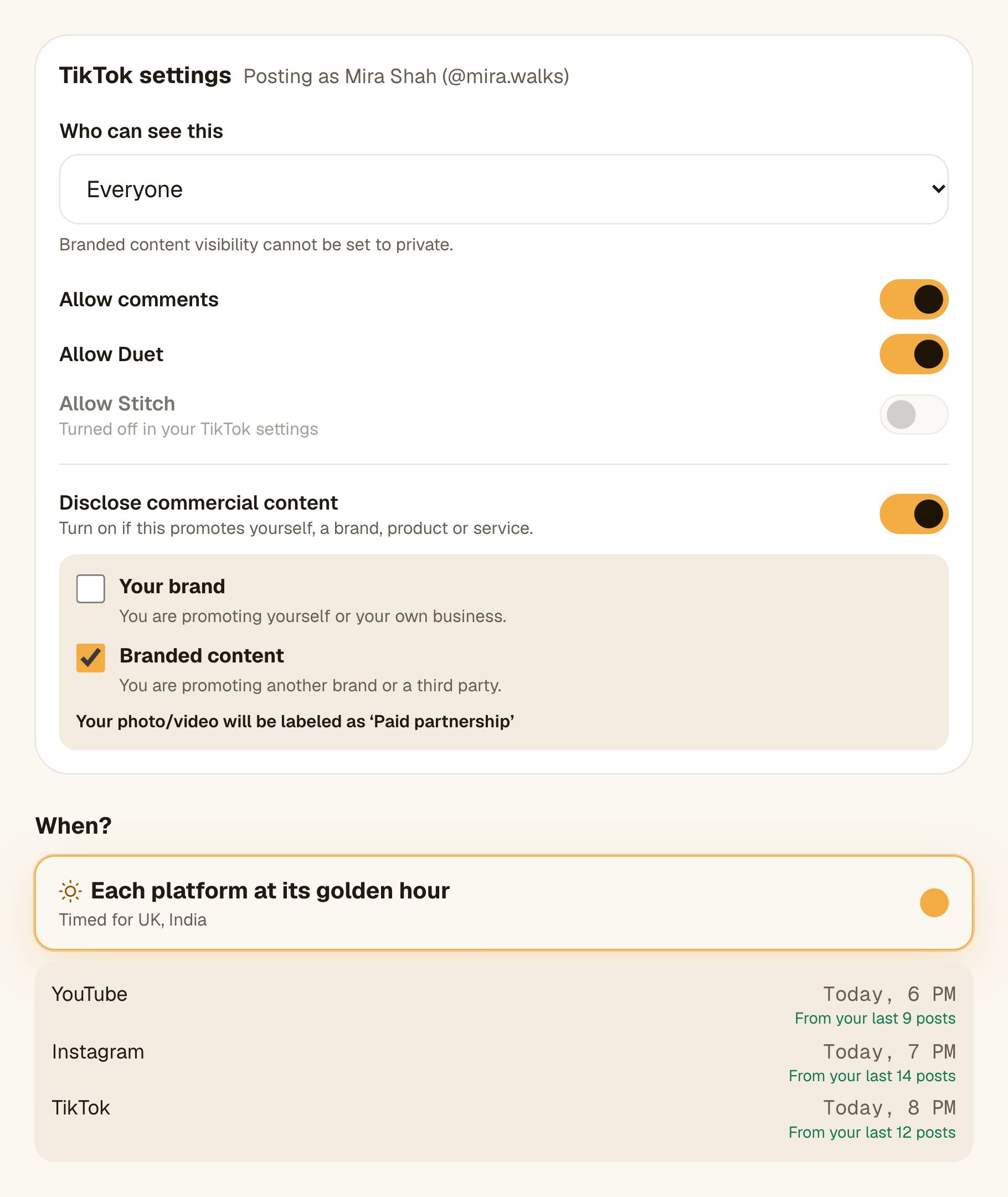
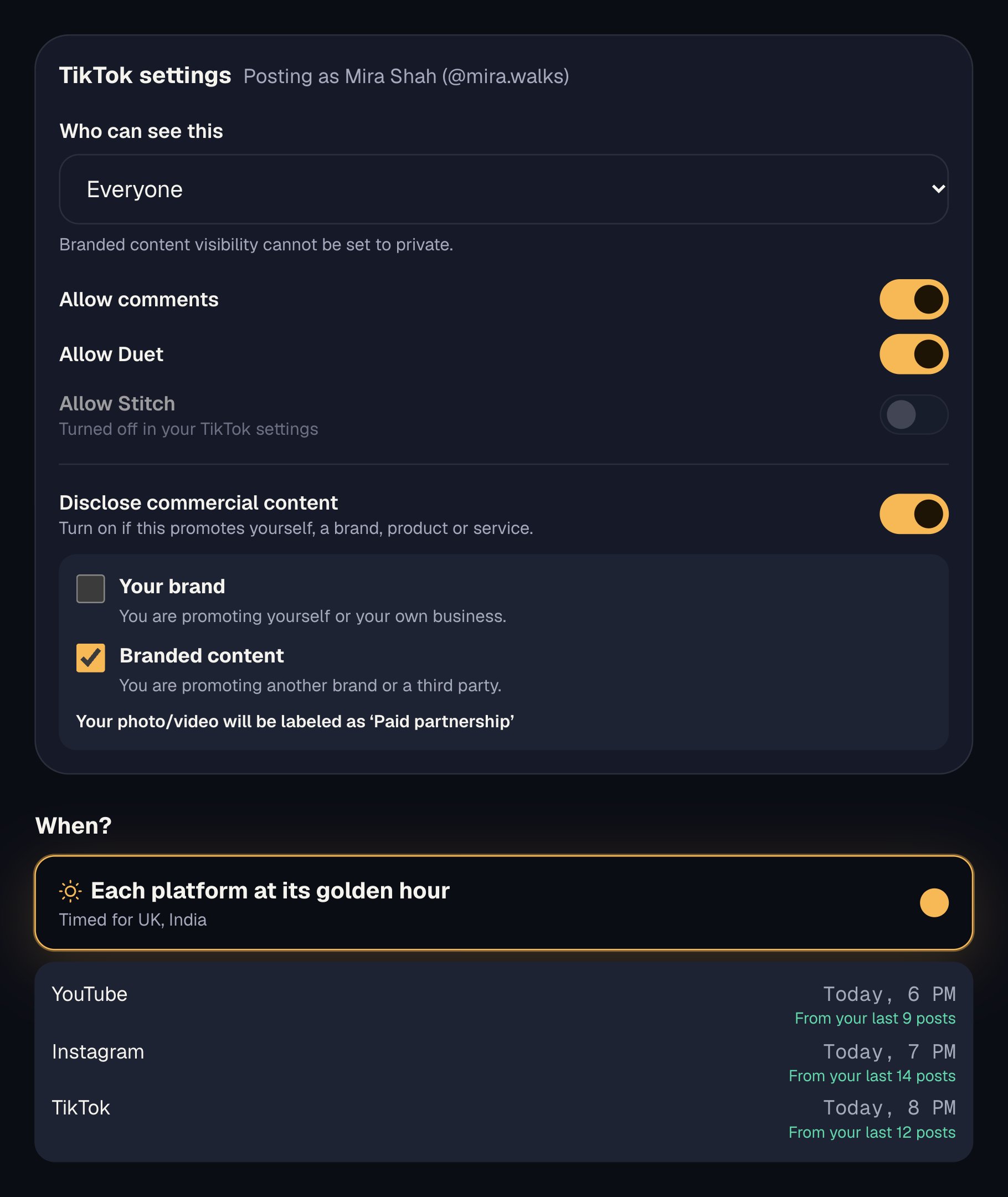
Before it posts, Octoque shows TikTok’s required settings for that account: who can see it, comments, Duet, Stitch and commercial content disclosure. Nothing is pre-picked, because TikTok requires that you choose.[1] You can also pick a cover and add a location.
What you can post on TikTok with Octoque
Everything marked Auto-publish goes out on its own at the time you set. You get a notification when it’s live, or a plain explanation if TikTok turned it down.
- Auto-publishVideo, direct to your profileUp to 3:00 in Octoque, and within the longest video TikTok allows your account.
- Auto-publishPhoto post (up to 35 photos)Comments only: Duet and Stitch don’t exist on photo posts.[1]
- Auto-publishSend to your TikTok draftsFinish in TikTok: add a sound or effects in the app and post from there. Up to 5 a day.
- Auto-publishCover, location, Made with AI labelCover: a frame from the video, or a photo. Location and the AI label are for videos.
- Not possibleTikTok sounds and effects from OctoqueApps can’t add them. Send it to drafts and add them in TikTok, or mix music in before you upload.
- Not possibleFirst commentTikTok’s API has no way to post one.
TikTok’s limits, and Octoque’s
These numbers come from TikTok’s own documentation. Each links to the page it came from.
| What | Limit | Source |
|---|---|---|
| Caption length | 2,200 charactersVideo posts: "The maximum length is 2200 in UTF-16 runes." Photo posts: title 90, description 4,000. | developers.tiktok.com |
| Video: shape | 9:16TikTok's posting API sets only pixel limits (360 to 4096 px each side); 9:16 vertical is what TikTok recommends. | ads.tiktok.com |
| Video: size | 1080 × 1920 pxAny size from 360 to 4096 px on each side is accepted; 1080×1920 is the usual vertical size. | developers.tiktok.com |
| Video: length | up to 10:00 min10 minutes through the API, but each creator has their own limit (max_video_post_duration_sec, often shorter). Octoque reads it before posting. | developers.tiktok.com |
| Video: file size | up to 4 GB | developers.tiktok.com |
| Video: file types | MP4, WebM, MOVH.264 recommended; H.265, VP8, VP9 accepted. | developers.tiktok.com |
What Octoque itself allows on TikTok today:
- Captions up to 2,200 characters, with a live counter under the caption.
- Videos up to 3:00. Longer ones can be trimmed for TikTok alone (keep the start or the end), while other platforms get the full video.
- One video, or up to 35 photos. Files: MP4, MOV, JPG, PNG or WebP, up to 1 GB.
- TikTok needs a photo or video. Text-only posts leave TikTok out.
How Octoque handles TikTok
When you pick a TikTok account, Octoque asks TikTok for that account’s current options: its nickname, the privacy levels it allows, which interactions are switched on, and its longest allowed video. If TikTok says the account can’t post more right now, Octoque tells you and doesn’t send the post.
There is no default in the Who can see this menu, and Comment, Duet and Stitch start off. Anything you turned off in TikTok shows greyed out here.[1]
Turn on disclosure and choose Your brand (labelled ‘Promotional content’) or Branded content (labelled ‘Paid partnership’). Branded content can’t be set to Only me, so Octoque blocks that pair.[1]
Turn on Finish in TikTok and the video lands in your TikTok drafts instead of going live. Add a trending sound or effects there, then post it yourself.
Pick a frame from the video, or a photo. On most TikTok accounts a photo becomes the video’s first frame, so Octoque tells you; a frame avoids that.
TikTok comments and DMs show in Octoque’s inbox. TikTok allows up to 10 DM replies within 48 hours of someone’s last message, and Octoque shows how many you have left.
When it posts: 8 pm, then your own hour
Pick “Each platform at its golden hour” and TikTok goes out at 8 pm where your audience lives, not where you are. It’s a starting point that adapts: once your posts have results, your own best hours take over.
How to connect TikTok
- In Octoque, open Connected accounts and tap Connect next to TikTok.
- Sign in on TikTok’s own page and approve posting. Octoque never sees your password.
- Make a post: Octoque shows the account’s nickname and its current TikTok options before you schedule.
Step-by-step help with screenshots: Connect TikTok to Octoque.
What you can’t do on TikTok, and why
Some limits are TikTok’s, set in its official API; a few are Octoque’s own for now. Here they are, so nothing surprises you after you’ve scheduled.
- Post publicly from an app TikTok hasn’t audited. TikTok restricts everything an unaudited app posts to private viewing.[2] This is a rule for every scheduler, so it’s a fair question to ask any of them.
- Post without limit. TikTok has a daily cap on how many posts one creator can publish through the API. When it’s reached, TikTok says the account can’t post more right now.[3]
- Pre-pick privacy or switch interactions on for you. TikTok’s guidelines require the creator to choose each time.[1]
- Edit or delete a post after it’s live. TikTok doesn’t let apps do either. Change it in the TikTok app.
- Add watermarks or promo branding. TikTok forbids apps from adding them,[1] and Octoque never does on any platform.
Questions people ask
Does it post directly, or send the video to my TikTok drafts?
Directly, unless you turn on Finish in TikTok. Then it goes to your TikTok drafts (up to 5 a day) and you post it from the app.
Why do I have to choose who can see it every time?
TikTok requires apps to show a privacy menu with no default value.[1] It keeps you in charge of every post.
Why is Duet or Stitch greyed out?
You’ve turned it off in your TikTok settings. Octoque reads that from TikTok and won’t switch it on.
Can I post a TikTok photo carousel?
Yes. Add up to 35 photos to one post. TikTok takes photos only when a post has more than one file, so a video can’t be mixed in.
My video is longer than 3 minutes. What happens?
Octoque asks you to keep the start or the end for TikTok, or leave TikTok out. Your other platforms still get the full video.
Can I use Octoque for TikTok if I live in India?
TikTok isn’t available in India, but you can still connect a TikTok account you run for an audience abroad. Octoque never hides a platform based on where you live.
Related
Other platforms
Sources
All links checked on 14 October 2026.
- TikTok for Developers: Content Sharing Guidelines (updated 4 August 2026)
- TikTok for Developers: Content Posting API, Get started
- TikTok for Developers: Content Posting API reference, Direct Post
- TikTok limits: ads.tiktok.com. Used for video: shape
- TikTok limits: developers.tiktok.com. Used for video: size, video: length, video: file size, video: file types
Your next post could go out at golden hour tonight.
Set it up in three minutes. Free for 14 days, no card needed.
Start free