Schedule YouTube Shorts from one upload
Updated Platform rules checked
Octoque uploads videos up to 3 minutes to your YouTube channel through YouTube’s official API. A vertical or square video of that length becomes a Short; YouTube decides that from the shape and length.[1]
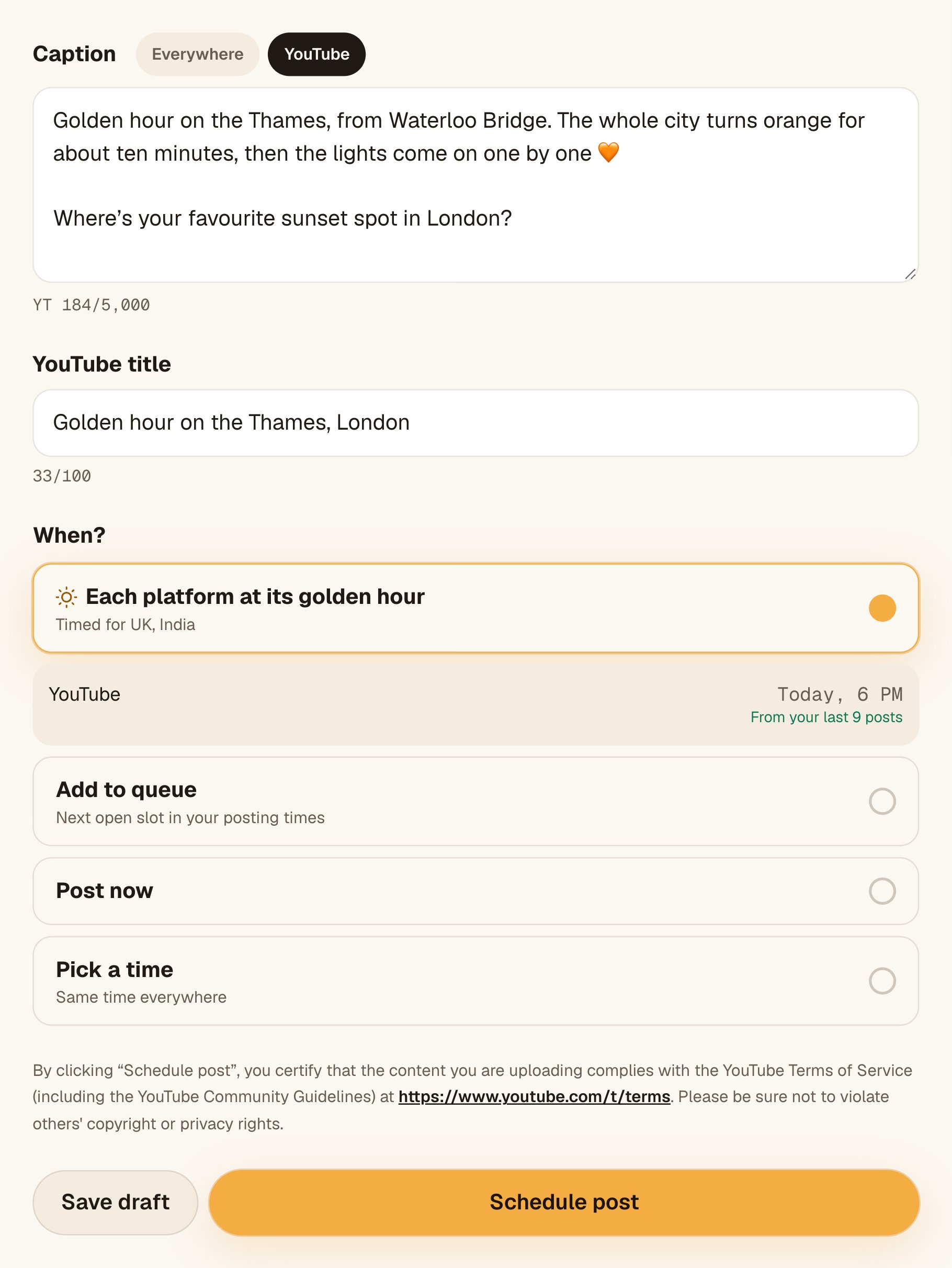
Every upload needs a title (up to 100 characters). Your caption becomes the description. You can add the video to a playlist, add captions made from what Octoque AI hears (fix any line before it posts), set it public, unlisted or private, and add a first comment. Videos longer than 3 minutes aren’t supported yet.
What you can post on YouTube with Octoque
Everything marked Auto-publish goes out on its own at the time you set. You get a notification when it’s live, or a plain explanation if YouTube turned it down.
- Auto-publishShorts (vertical or square, up to 3:00)YouTube treats square and vertical videos up to 3 minutes as Shorts.[1]
- Auto-publishHorizontal videos up to 3:00They post as regular videos, because of their shape.
- Auto-publishPlaylists and captionsPick a playlist or make a new one. Captions come from the video’s sound, editable line by line.
- Auto-publishCustom thumbnailA frame or a photo, on regular videos. Shorts can’t take one through the API.
- Auto-publishVisibility, made for kids, tags, category, first commentPublic, unlisted or private. First comment up to 10,000 characters.
- Not yetLong videos (over 3:00)Octoque caps YouTube at 3:00 today. Keep the start or end, or leave YouTube out.
- Not possiblePhotos or text postsYouTube needs a video. Octoque leaves YouTube out of photo posts.
YouTube’s limits, and Octoque’s
These numbers come from YouTube’s own documentation. Each links to the page it came from.
| What | Limit | Source |
|---|---|---|
| Caption length | 5,000 charactersThe description limit is 5,000 BYTES, not characters: emoji and many non-Latin letters take 2 to 4 bytes each. Angle brackets (< >) are not allowed. | developers.google.com |
| Title length | 100 charactersAngle brackets (< >) are not allowed. | developers.google.com |
| Hashtags | up to 60More than 60 hashtags and YouTube ignores all of them. Up to three show by the title. | support.google.com |
| Shorts: shape | 9:16, 1:1A Short is any square or vertical video up to 3 minutes (uploads from 15 Oct 2024). | support.google.com |
| Shorts: size | 1080 × 1920 pxYouTube recommends MP4 with H.264 High Profile and AAC audio, uploaded at the frame rate it was filmed. | support.google.com |
| Shorts: length | up to 3:00 min | support.google.com |
| Shorts: file size | up to 256 GB256 GB or 12 hours, whichever is less. | support.google.com |
| Long video: shape | 16:916:9 is standard on computers; other ratios play with bars. | support.google.com |
| Long video: size | 1920 × 1080 px | support.google.com |
| Long video: length | up to 15:00 min15 minutes unless the channel is verified. | support.google.com |
| Long video: file size | up to 256 GB256 GB or 12 hours, whichever is less. | support.google.com |
What Octoque itself allows on YouTube today:
- Captions up to 5,000 characters, with a live counter under the caption.
- Videos up to 3:00. Longer ones can be trimmed for YouTube alone (keep the start or the end), while other platforms get the full video.
- One video. Files: MP4, MOV, JPG, PNG or WebP, up to 1 GB.
- YouTube needs a video. Text-only posts leave YouTube out.
How Octoque handles YouTube
YouTube gets its own title field (up to 100 characters, required), and your caption becomes the description. YouTube measures the description in bytes (5,000), so emoji and non-Latin letters take more room. The preview shows both before you schedule.
Turn on Captions and Octoque AI writes them from the video’s sound. Open them to fix any word, line by line. If the sound can’t be heard, the video still posts, without captions.
YouTube’s API terms require apps to show an upload certification. Octoque puts it right above the button: by clicking, you certify the video follows YouTube’s Terms of Service and Community Guidelines.[2]
YouTube blocks Shorts longer than one minute that carry an active Content ID claim, worldwide.[1] If your Short uses music you don’t own, keep it under a minute or clear the rights first.
Spotted a typo after it went live? Edit the description from the post in Octoque. Comments on your videos show in Octoque’s inbox.
When it posts: 6 pm, then your own hour
Pick “Each platform at its golden hour” and YouTube goes out at 6 pm where your audience lives, not where you are. It’s a starting point that adapts: once your posts have results, your own best hours take over.
Best time to post YouTube Shorts · Best time to post on YouTube · How golden hour works
How to connect YouTube
- In Octoque, open Connected accounts and tap Connect next to YouTube.
- Sign in with the Google account that owns the channel and approve uploads. Octoque never sees your password.
- Your channel shows in your account list, ready for the next post. Add another channel the same way.
Step-by-step help with screenshots: Connect YouTube to Octoque.
What you can’t do on YouTube, and why
Some limits are YouTube’s, set in its official API; a few are Octoque’s own for now. Here they are, so nothing surprises you after you’ve scheduled.
- Upload videos over 3 minutes through Octoque. That’s Octoque’s own limit today, not YouTube’s.
- Make a horizontal video into a Short. YouTube decides by shape: only square and vertical videos up to 3 minutes count as Shorts.[1]
- Set a custom thumbnail on a Short. Thumbnails work on regular videos only.
- Skip the certification. YouTube requires it next to the upload button in every app that uploads for you.[2]
- Add Shorts music from YouTube’s library. Octoque uploads your file as it is.
Questions people ask
Will my video show up as a Short?
If it’s vertical or square and 3 minutes or less, yes. YouTube classifies it on upload.[1]
Can I schedule long YouTube videos?
Not yet. Octoque posts to YouTube up to 3 minutes today. For a longer file it asks you to keep the start or the end, or leave YouTube out.
Do I have to write a separate title?
Yes. YouTube needs a title, and a good one helps people find the video. Your caption becomes the description.
Can Octoque add my video to a playlist?
Yes. Pick a playlist in the YouTube card, or tap + New playlist. The video is added after it uploads.
Can I post the same video to TikTok and Instagram too?
Yes. Pick all three in one post. Each goes out at its own golden hour: YouTube at 6 pm, Instagram at 7 pm and TikTok at 8 pm, in your audience’s time zone.
Is the upload public?
Public by default. You can set it to unlisted or private in the YouTube card.
Related
Other platforms
Sources
All links checked on 14 October 2026.
- YouTube Help: Upload YouTube Shorts (Shorts up to three minutes; Content ID rule)
- YouTube API Services Terms of Service, section 9.1 (updated 14 September 2026)
- YouTube Data API: Videos insert
- YouTube limits: developers.google.com. Used for caption length, title length
- YouTube limits: support.google.com. Used for hashtags
- YouTube limits: support.google.com. Used for shorts: size, long video: shape, long video: size
- YouTube limits: support.google.com. Used for shorts: file size, long video: length, long video: file size
Your next post could go out at golden hour tonight.
Set it up in three minutes. Free for 14 days, no card needed.
Start free